
 Deutsch
 Français
 日本語
 Español
 Italiano
 Русский
 繁體中文
 한국어

CNC machines have completely changed modern manufacturing. But have you ever wondered how these machines create exact designs and cuts? The answer lies in the set of instructions created by CAM software. Many think that this software is expensive, but that’s not always true. Today, there are many free CAM programs that offer powerful features. But the challenge is that every CAM software is different. So it can become very tricky to find the right software. However, there is no need to worry! In this guide, I will discuss some of the best free CAM software, along with their features and specifications. So let’s get started!
Overview of CAM Software

Let’s first try to understand what CAM software actually is.
CAM software (Computer-Aided Manufacturing) is a tool that prepares digital designs for manufacturing. It takes a design created in CAD software and converts it into instructions that CNC machines can follow. These instructions tell the CNC machine how to cut, drill, shape, or engrave a material with accuracy.
In simple words, CAM software is a translator between your design and the CNC machine. Actually, when you are using a CNC machine, you first have to create a design. That design is generally created on CAD software in 3D models. However, CNC machines cannot understand the drawings or models to cut, drill, or create a design on any material.
That’s where CAM software comes into the scene. This is specialized software that reads the design from CAD and then creates a language that the machine can understand. Now CNC machines can easily read those instructions and precisely cut or create designs. Without CAM software, using a CNC machine would be much more difficult and time-consuming.
Some Best Free CAM Software
There are many free CAM software programs available today. However, it does not mean they all work in the same way. Every CAM software has its unique features and limitations. So if you are just getting started with CNC machining, knowing about each free CAM software is very crucial. To make things easier for you, I will discuss some of the best free CAM software that you can trust.
1- FreeCAD Path Workbench
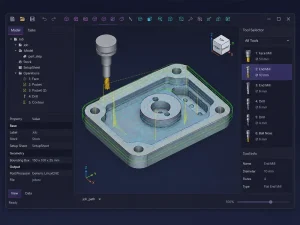
The first most popular free CAM software tool for CNC machining services is FreeCAD Path Workbench. It is a part of the FreeCAD software and is specially designed to create toolpaths for CNC machines. It combines CAM and CAD software, so you can create and prepare the design in a single tool, with no need to switch between them. It is open-source, so anyone can download and use it without paying.
That’s why it is a good choice for students, hobbyists, and small businesses that want a reliable CAM solution at no cost. The software allows you to import or create a 3D model. After that, you can plan how a CNC machine will cut or shape the material. You can also choose machining operations such as drilling, pocketing, facing, and contour cutting. After selecting these operations, the software will create toolpaths that will guide the CNC machine step by step. You can also preview the toolpaths before exporting them as G-code.
2- Fusion 360
Fusion 360 is free personal-use CAM software for people who want to learn CNC machining or work on personal projects. It is very easy to use compared to many other CAM programs. How? Actually, once your design is ready, Fusion 360 will help you plan every step of the machining process. You can choose the type of cutting tool, decide how deep the machine should cut, set the cutting speed, and decide the toolpath.
After that, the software will generate G-code. This code is the set of instructions that will tell the CNC machine what to do. The best thing about this CAM software is its simulation feature. This feature lets you see how the CNC machine will operate before machining starts. It means you can find and fix mistakes earlier, improving the final results.
3- LinuxCNC
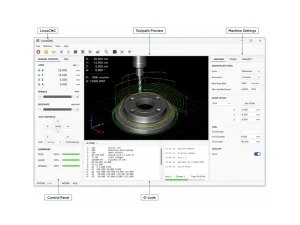
LinuxCNC is a little different from most of the other software on this list. As you can see, other CAM software mainly focuses on creating toolpaths, right? But the main job of LinuxCNC is to control and run a CNC machine. After another CAM program creates the G-code, LinuxCNC reads those instructions and tells the machine exactly what to do.
It supports various types of machines, including CNC mills, lathes, routers, and plasma cutters. LinuxCNC also lets you adjust machine settings and control machine movements. That’s the reason this free CAM software is used by experienced CNC users. However, LinuxCNC runs on the Linux operating system. Therefore, it might take a little time to learn if you have never used Linux before.
4- PyCAM
PyCAM is a free and open-source CAM software that converts 3D digital models into toolpaths for CNC machines. So, it is mainly designed for users who want to machine 3D objects. The software allows you to import a 3D model, choose the cutting tool, and set machining options. Once done, it creates the toolpaths that the CNC machine will follow. It supports several common 3D file formats, so there is no need to worry if you have created designs in other CAD software.
Additionally, before exporting the G-code, PyCAM also allows you to preview the toolpaths. You can check whether the cutting process looks correct. However, one common drawback of this free CAM software is that it does not include advanced features. That’s why it might not suit professional CNC machining work.
5- Estlcam (Free Trial Version)
Now, it comes to Estlcam, a beginner-friendly, free CAM software for CNC machining. It is mainly used for CNC routers, milling machines, and engraving projects. Although this software is not free, it still offers free trials so you can see and learn about its main features before buying. One thing that makes Estlcam stand out is its easy workflow.
Once you import the design file, you can quickly select the areas you want to cut, drill, or engrave. The software will then choose the right machining settings and create a precise toolpath. It also allows you to preview the cutting process before final production. So there is no chance of errors in the final products.
6- Kiri: Moto
Kiri is free, browser-based CAM software that lets you create toolpaths without the need to install any programs on your computer. You just need to open it in a web browser, upload your design, and start preparing it for CNC machining. There is no need to install it on your computer or do difficult processing.
In addition to CNC machining, it supports other processes such as 3D printing, laser cutting, and waterjet cutting. For CNC projects, it helps you import 2D or 3D models and create precise toolpaths for CNC machines. Moreover, Kiri is very flexible, so you can use it on different computers without lengthy setup.
7- Carbide Create
Now there is Carbide Create CAM software, designed to make CNC machining as simple as possible. Many CAM programs offer advanced tools that can be very confusing for beginners. But Carbide Create focuses only on the features that people use most often. As a new user, you can spend less time learning the software and more time creating projects.
With this software, you can create a basic design yourself and then specify which parts should be cut, carved, drilled, or engraved. After you choose the cutting tool and machining material, the software will generate the toolpaths for your CNC machine. But remember, Carbide Create does not include the more advanced features found in other software. So it is best for newbies, learners, and basic CNC machine designs.
8- BlenderCAM
Last but not least, BlenderCAM is another free CAM add-on for Blender. Blender is the world’s most popular 3D modeling program. This means that this software is not confined to CNC machining. Instead, it is best for those who want to create detailed, creative 3D designs first, then manufacture them using a CNC machine. BlenderCAM has the ability to handle artistic and detailed designs.
It is often used for making decorative wood carvings, custom signs, molds, and sculptures. Also, since it runs in Blender, you can create, edit, and prepare your model on the same platform. However, due to its advanced features, it takes some time to learn and understand this software. But for detailed designs, many expert CNC users prioritize it.
Frequently Asked Questions
What is the best free CAM software for beginners?
FreeCAD Path Workbench, Carbide Create, and Fusion 360 are among the best free CAM software options for beginners. They offer useful features, learning resources, and simple workflows. All this helps beginners understand everything easily.
Is free CAM software good enough for professional work?
Yes, some free CAM software is good enough for certain professional projects. However, paid CAM software typically offers more advanced features, and skilled CNC users tend to prioritize them.
Does CAM software work with every CNC machine?
Not always. Most CAM software generates G-code for many CNC machines. However, the final compatibility depends on the machine and the post-processor it uses. That’s why it is always a good idea to check whether the software supports your specific CNC machine.
Conclusion
CNC machining has become a favored manufacturing option in modern industries. However, CNC machines do not work alone without any instructions. Instead, they follow computerized instructions created in CAD. But before the machine follows those instructions, it must be converted into a readable format. That’s where CAM software comes into play. This is the software that takes designs from CAD and converts them into G-code that CNC machines can read.
But the good news is that many CAM software programs are free and help many beginners and even experts. However, not all CAM software works in the same way. That’s why, to make things clear for you, I have discussed some of the best free CAM software in this guide. You can choose the one that best matches your skills, projects, design needs, and the type of CNC machine you use.